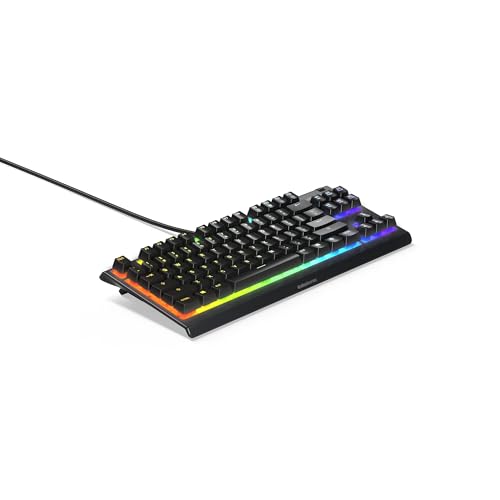
Mechanical keyboard switches, explained simply: every key on a mechanical keyboard sits on its own switch, and the type of switch decides how the key feels and sounds. There are three main families. Linear switches press smoothly from top to bottom. Tactile switches have a small bump you can feel. Clicky switches add an audible click. For gaming, linear switches are the most popular, but the right choice depends on what you play, whether you type a lot, and who else shares your room.
This guide explains the three switch types, what the common colors usually mean, how hot-swap, optical, and magnetic switches change things, and how to pick the right switch for gaming and typing.
The three switch types
| Type | Feel | Sound | Best for |
|---|---|---|---|
| Linear | Smooth, no bump | Quiet to moderate | Fast gaming, rapid presses |
| Tactile | Noticeable bump at actuation | Moderate | Typing with some gaming |
| Clicky | Bump plus a click | Loud | Typing feedback; not shared rooms |
Linear switches
Linear switches travel straight down with no bump. They are smooth and consistent, which makes rapid repeated presses easy. Most gaming-focused keyboards ship with linear switches by default. Common examples are switches labeled Red (lighter) and Black (heavier), and speed variants labeled Silver or Speed with a shorter actuation point.
Tactile switches
Tactile switches have a bump partway down that tells your finger the key has registered. Many people find them more pleasant for typing, because you can feel each keystroke without bottoming out. They still work well for gaming. Common examples are switches labeled Brown.
Clicky switches
Clicky switches combine a tactile bump with a distinct click sound. They give the most feedback and are satisfying to type on, but the noise can bother people nearby and is often picked up by microphones on voice chat and streams. Common examples are switches labeled Blue.
Switch colors are a guideline, not a standard
Switch colors started with one manufacturer's naming and were widely copied, so a Red is usually linear, a Brown usually tactile, and a Blue usually clicky. But colors are not a formal standard. Different brands' switches with the same color can feel noticeably different in weight, smoothness, and sound.
When you compare keyboards, read the switch description rather than relying on the color alone. Look for:
- Type: linear, tactile, or clicky.
- Actuation force: how hard you press for the key to register, usually around 35 to 60 grams. Lighter switches are faster but easier to press accidentally.
- Actuation point: how far down the key registers. Shorter actuation can feel faster in games.
- Total travel: how far the key moves before bottoming out.
Which switch is best for gaming?
Linear switches are the most common choice for gaming, for good reasons:
- No bump means consistent, fast presses.
- Double-tapping and rapid key presses feel smoother.
- They are typically quieter than clicky switches, which matters for voice chat.
That said, the best gaming switch is one you are comfortable with. Tactile switches are perfectly good for gaming, and many players who also type a lot prefer them.
Light or heavy?
- Lighter linear switches (around 35 to 45g) are fast and low-effort, popular with competitive players.
- Heavier switches (around 55 to 60g+) reduce accidental presses and suit players who rest their fingers heavily on the keys.
Which switch is best for typing?
For typing, tactile switches are a common favorite because the bump confirms each keystroke. Clicky switches add more feedback but more noise. Linear switches are also fine for typing once you get used to them, and many people use them for everything.
If your keyboard is for both work and gaming, tactile is a safe middle ground, or linear if gaming is your priority.
Hot-swappable switches
A hot-swappable keyboard lets you pull switches out and replace them without soldering. That gives you three big advantages:
- Try different switches without buying a new keyboard.
- Fix a faulty switch by replacing just that one.
- Upgrade later as your preferences change.
Hot-swap support has become common even on affordable keyboards, and it is one of the best features to look for if you are unsure which switch you want. Check that your replacement switches match the socket type, since most hot-swap boards accept common 3-pin or 5-pin MX-style switches.
Browse current options on our hot-swappable gaming keyboards list.
Optical and magnetic switches
Beyond traditional mechanical switches, two newer technologies are popular in gaming keyboards.
Optical switches
Optical switches use a beam of light to detect a keypress instead of metal contacts. They can register very quickly and resist wear from contact corrosion. Their feel is usually linear or clicky, depending on the design. Some brands, including Razer, use optical switches across many of their keyboards.
Magnetic (Hall effect) switches
Magnetic switches sense how far a key is pressed using a magnet and a sensor. That enables two features gamers like:
- Adjustable actuation: set how far down a key registers, from a very light touch to a deep press.
- Rapid trigger: a key resets the instant you start to lift it, which makes quick direction changes in games feel very responsive.
Magnetic switch keyboards have become a popular choice for competitive players. They are usually more expensive than standard mechanical keyboards, but discounts are common as more models arrive.
Keyboard size and layout
Switches are only part of the choice. Size affects desk space and mouse room.
| Layout | What is included | Why choose it |
|---|---|---|
| Full-size (100%) | Everything, including the number pad | Typing numbers, office work |
| TKL (tenkeyless, ~80%) | No number pad | More mouse room, still has arrows and function row |
| 75% | Compact, keeps function row and arrows | Small but practical |
| 65% | Drops function row, keeps arrows | Very compact, popular for gaming |
| 60% | Drops arrows and function row | Maximum mouse room |
Many gamers prefer TKL or smaller layouts for more space to move the mouse. Our compact gaming keyboards list shows current TKL, 75%, 65%, and 60% options.
Wireless mechanical keyboards
Wireless mechanical keyboards have improved as much as wireless mice. Gaming models with a 2.4GHz receiver are fast enough for competitive play, while Bluetooth is fine for work and switching between devices. Brands such as Keychron are known for wireless boards, and most major gaming brands offer wireless versions. See our wireless gaming keyboards list.
How to choose
- Pick a switch type: linear for gaming, tactile for mixed use, clicky only if noise is not a concern.
- Choose a weight: lighter for speed, heavier to avoid accidental presses.
- Choose a size: TKL or smaller for more mouse room.
- Prefer hot-swap if you are unsure, so you can change switches later.
- Consider magnetic switches if you play competitive games and want rapid trigger.
Keycaps: ABS vs PBT
The keycaps on top of the switches also change how a keyboard feels and ages.
- ABS plastic is common on stock keyboards. It feels smooth but can develop a shiny, worn look over time.
- PBT plastic is harder and more textured, resists shine, and often sounds deeper.
If you buy a keyboard with a standard layout, you can replace the keycaps later. Check that the keyboard uses standard MX-style stems and a standard bottom row if you plan to customize.
Sound and dampening
Two keyboards with the same switches can sound very different. Foam inside the case, the plate material, and the stabilizers on large keys such as the spacebar all change the sound. Many current gaming keyboards include internal foam and pre-lubricated stabilizers for a quieter, more solid sound. If noise matters, look for these features in the listing, along with quieter linear or silent switches.
The bottom line
Linear switches are the go-to for gaming, tactile switches are a great all-rounder, and clicky switches are best kept for solo typing. If you are not sure, buy a hot-swappable keyboard so you can experiment. Compare current prices on our gaming keyboards page, our mechanical gaming keyboards list, and our gaming keyboards under $100 list.
Frequently asked questions
Are red or brown switches better for gaming?
Red (linear) switches are the more common choice for gaming because they press smoothly without a bump, making rapid presses easy. Brown (tactile) switches are also good for gaming and many people prefer them for typing.
Are clicky switches bad for gaming?
They work fine for gaming, but they are loud and the click is often picked up by microphones. Most gamers prefer linear or tactile switches.
What does hot-swappable mean on a keyboard?
It means you can pull out and replace the switches without soldering, so you can try different switches or replace a faulty one.
What is rapid trigger on a keyboard?
A feature of magnetic (Hall effect) switch keyboards where a key resets as soon as you start lifting it, rather than at a fixed point. It makes quick direction changes in games feel more responsive.
About the author
Bryce Dodson
Bryce Dodson covers gaming PC hardware for ClearanceStream, with a focus on prebuilt desktops, writing about how CPU, GPU, memory, storage, and power supply choices affect real-world performance and long-term upgradability.