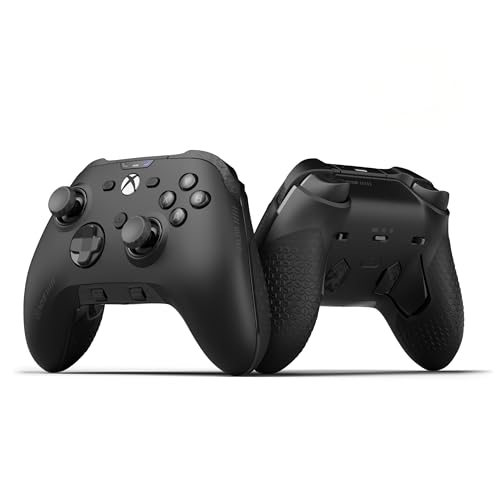
Are pro controllers worth it? For competitive players, usually yes. Back paddles let you jump, crouch, or reload without taking your thumb off the right stick, trigger stops shorten trigger travel for faster shots, and newer Hall effect sticks resist the stick drift that wears out standard controllers. For casual players, a standard controller is often all you need, and a mid-priced controller with Hall effect sticks can be the best value of all.
This guide explains what you get from a pro controller, what stick drift is and how to avoid it, how platform compatibility works on PC, PS5, and Xbox, and how to choose a controller at every budget.
What makes a controller "pro"?
Pro controllers add hardware features aimed at competitive play and comfort:
- Back paddles or buttons: extra inputs on the back of the controller, mapped to face buttons so you can act without moving your thumbs.
- Trigger stops: switches that shorten trigger travel, so shots register sooner.
- Adjustable stick tension and interchangeable sticks: taller sticks for precision, shorter for speed.
- Hall effect or TMR sticks: magnetic sensors that resist drift.
- Remapping and profiles: save different button layouts per game.
- Premium grips and build quality.
Brands such as SCUF Gaming, PowerA, 8BitDo, and the platform makers themselves through Xbox and PlayStation offer controllers with some or all of these features.
Back paddles: the biggest upgrade
On a standard controller, pressing a face button means taking your right thumb off the aiming stick. In a shooter, that means briefly losing control of your aim every time you jump or crouch.
Back paddles fix this. You map jump, crouch, reload, or other actions to paddles pressed by your middle fingers, so your thumbs stay on the sticks. It takes a few days to adjust, but most players who get used to paddles do not want to go back.
Paddles are worth it if you play shooters, fighting games, or any game where reacting quickly while aiming matters.
Trigger stops
Trigger stops (sometimes called hair triggers) shorten how far you pull the trigger before it registers. In shooters, that can make shots fire a fraction of a second sooner. Many pro controllers let you switch between full travel for racing games, where analog control matters, and short travel for shooters.
Stick drift and Hall effect sticks
Stick drift is when a controller registers stick movement even when you are not touching it, causing your character or camera to creep. It is one of the most common controller failures.
Why drift happens
Most traditional controller sticks use potentiometers, which measure position with physical contact between parts. Over time, those parts wear and collect debris, and readings become inaccurate.
How Hall effect fixes it
Hall effect sticks measure position with magnets and a sensor, so there is no physical contact wearing down. That makes them far more resistant to drift. TMR (tunnel magnetoresistance) sticks are a newer magnetic design that works on a similar principle with lower power use.
Hall effect sticks used to be found only on premium controllers. They are now common on mid-priced and even budget controllers, especially from third-party makers. If drift has killed a controller before, a Hall effect controller is the single best upgrade you can make.
Platform compatibility: PC, PS5, and Xbox
Controller compatibility is more complicated than it looks, so check carefully before you buy.
Xbox controllers
Xbox controllers work natively with Xbox consoles and Windows PCs, and are the most widely supported controllers in PC games. Licensed third-party Xbox controllers also work on both.
PlayStation controllers
PS5 controllers work on PS5 and on PC through Steam and many games directly. Advanced features such as adaptive triggers and haptics work fully only in supported games. Third-party PS5 controllers must be officially licensed to work on PS5.
PC-focused controllers
Many third-party controllers are built for PC first, with Switch or mobile support. They often offer the best features for the money, including Hall effect sticks and back buttons, but may not work on consoles.
| Controller type | Xbox | PS5 | PC |
|---|---|---|---|
| Official or licensed Xbox | Yes | No | Yes |
| Official or licensed PS5 | No | Yes | Yes, through Steam or supported games |
| PC-focused third party | Usually no | Usually no | Yes |
Always check the listing for the platforms supported. Our Xbox controllers and PS5 controllers lists only include controllers whose listings name that platform.
Wired or wireless?
Most controllers today are wireless, using a dedicated 2.4GHz dongle, the console's own wireless protocol, or Bluetooth. Many also work wired over USB-C, which removes any concern about battery life or latency. Competitive players sometimes play wired at tournaments, but modern wireless controllers are responsive enough for the vast majority of players.
Check battery life and how the controller charges. Some use rechargeable packs, others use AA batteries, and premium models may include charging docks.
What to spend
| Budget | What you get |
|---|---|
| Under $40 | Wired or basic wireless controllers; some now with Hall effect sticks |
| $40 to $100 | Strong wireless controllers, often Hall effect sticks and back buttons |
| $100 to $200 | Premium official and third-party pro controllers |
| $200+ | Top-end pro controllers with paddles, trigger stops, and premium build |
The middle of the market has improved enormously. A well-reviewed $60 to $100 controller with Hall effect sticks and two back buttons delivers most of what made pro controllers special a few years ago. See current options on our controllers under $100 list.
Are premium pro controllers worth it?
Worth it if:
- You play competitive shooters or fighting games regularly.
- You want paddles, trigger stops, and adjustable sticks together in a premium build.
- You prefer the shape of a specific premium controller.
Not worth it if:
- You play mostly single-player or casual games.
- A mid-priced controller with Hall effect sticks and back buttons covers your needs.
Premium controllers see regular discounts, especially outgoing models when a new version launches. Compare current prices on our Xbox gaming controllers under $300, PS5 gaming controllers under $300, and PC gaming controllers under $300 lists.
Setting up back paddles: a starter layout
If you are new to paddles, start simple. Map only two actions and add more once they feel natural.
- Shooters: map jump to one paddle and crouch or slide to the other. These are the actions you most often need while aiming.
- Battle royales: add reload and interact once the first two feel automatic.
- Sports games: map sprint or skill moves, which are otherwise awkward to combine with stick movement.
- Racing games: map gear shifts so your thumbs stay free for steering and camera.
Most players adapt within a week of regular play. Use the controller's profiles to keep a separate layout for each game, so you never have to remap mid-session.
Making any controller last longer
Whatever you buy, a few habits extend its life:
- Keep it clean. Wipe the sticks and buttons regularly and avoid eating while playing, since debris causes sticky buttons and stick wear.
- Store it properly. Avoid dropping it or leaving heavy objects resting on the sticks.
- Update firmware. Manufacturers release updates that fix input and connection issues.
- Calibrate if offered. Some controllers and platforms include stick calibration, which can correct minor drift on traditional sticks.
- Check the warranty. Stick drift is a common warranty claim, so keep your proof of purchase.
A Hall effect controller combined with these habits should stay accurate far longer than a standard controller.
Pro controllers for PC players
On PC, a controller is mainly for action, racing, sports, and couch games, while many shooters favor mouse and keyboard. PC players get extra flexibility because Steam Input can remap any button, including paddles, per game, and supports most popular controllers. That means a PC-focused controller with back buttons can match much of what a premium console controller offers, often for less money. Check whether the controller's own software runs on Windows if you want to change stick curves or trigger settings outside Steam.
The bottom line
Back paddles are the biggest competitive advantage a pro controller offers, and Hall effect sticks are the biggest reliability upgrade. Competitive players get real value from a pro controller; casual players can get most of the benefits from a well-chosen mid-priced controller. Always confirm platform compatibility before you buy. Browse every controller we track on our controllers page.
Frequently asked questions
Do Hall effect sticks prevent stick drift?
They greatly reduce it. Hall effect sticks measure position with magnets instead of parts that rub together, so they do not wear in the way that causes most drift.
Do back paddles really help?
Yes, especially in shooters. Paddles let you jump, crouch, or reload without taking your thumb off the aiming stick. It takes a few days to adjust.
Can I use a PS5 controller on PC?
Yes. PS5 controllers work on PC through Steam and in many games directly. Some features, such as adaptive triggers and haptics, only work fully in supported games.
Are third-party controllers good?
Many are excellent and offer features such as Hall effect sticks and back buttons for less money. Check platform support, since PC-focused controllers usually do not work on consoles.
About the author
Jaden Williams
Jaden Williams writes ClearanceStream's guides to finding and judging gaming PC deals, focusing on separating genuine price drops from inflated list prices, and on showing readers how to value a discounted system by the components inside it.